Most people with a golf simulator use it the same way they use the driving range. Hit a ball, drag another one over, hit again. It feels like practice. It mostly isn't.
Actually getting better requires knowing what you're working on, having a way to measure it, and putting some stakes on it. A home simulator gives you all three. This is how to use it.
Figure Out Where You're Actually Losing Shots
We spoke with Jayson Nickol to get his take on the best ways to practice golf from home. Nickol is PGA and Titleist Performance Institute Level 1, Golf 2 certified, and one of the top coaches on the Skillest app. He knows what actually moves the needle for golfers at every level.

Before you start grinding on your driver, it's worth knowing whether your driver is even the problem. A lot of golfers practice what they enjoy rather than what costs them strokes.
If you have access to strokes gained data on your simulator, use it. Run a few simulated rounds and pay attention to where the wheels come off. Are you losing shots off the tee, or is it the 50-yard wedge you keep chunking? Nickol puts it plainly: "I'd recommend using strokes gained data or running combines on a simulator to see where you could improve." The answer changes what you should be working on.
For higher handicaps, Nickol says the fundamentals come first: grip, stance, posture, ball position, alignment. They're unsexy and they matter more than anything else. Getting a few lessons to lock those in before you start self-diagnosing with data is worth the investment. "Golf is so funny," Nickol said. "Most people get brought into the sport from another friend who plays and they just buy a used set and venture off on their own, ingraining bad habits from the start. Having somewhere at home that you can practice with the help from a coach is amazing." A home setup with a coach checking in remotely is a genuinely good combination.
For single-digit players looking to go lower, Nickol's advice is simple: identify your weak spots and attack them.
The Data That Actually Tells You Something
We also partner with PGA pro Mike Tabbert of Level Up Golf Academy to bring you video coaching built specifically around simulator practice. Tabbert works with Carl's Place to help golfers get more out of their setups, not just play more rounds, but actually improve. His breakdown of the data below is worth watching before you touch another number on your monitor.
Carry vs. Total
Carry is how far the ball flies. Total is where it ends up after it hits the ground. Tabbert cares more about carry, especially with irons and wedges, because that's the number that tells you whether you're holding the green.
Total still tells you something. Not much on its own, since it depends on what the ball lands on, but the gap between the two is useful. When Tabbert hit a pitching wedge that carried 130 and backed up to 127, that told him he had plenty of height. If that same shot had run out to 150, he'd be looking at launch angle and wondering if he was coming in too low.
Seeing too much run with your irons? Try moving the ball forward or back in your stance to raise or lower the flight.
Smash Factor
Smash factor is ball speed divided by club speed. Tabbert calls it "a great efficiency metric," and it's the fastest way to know whether you actually found the middle of the face.
His rough targets: high 1.2s to around 1.3 with a pitching wedge, about 1.37 with a 7-iron, and 1.5 with driver. Loft and club design move those a little, so compare yourself to yourself.
When he hit one off the toe on purpose, smash dropped to 1.22 and the distance went with it. A heel strike with the 7-iron dropped him to 1.34. The fix was almost boring. He backed up a smidgen from the ball, hit the next one, and smash jumped back over 1.4.
Simple rule. Catching it on the heel? Stand a little farther away. Toe? Get a little closer.
Club Face and Club Path
These two decide almost everything about left and right.
Face angle is where the club face points at impact, and it's mostly driven by your grip, wrists, hands, and forearms. It's also the big one. Tabbert puts it at over 80% of the influence on where the ball goes. "Face is going to be the king," he said.
Club path is the direction the club head is moving through impact, and that comes more from your arms and body. For a right-handed golfer, a path moving right is in to out. A path moving left is out to in. Path creates the curve, but it doesn't decide where the ball ends up.
The relationship between the two shapes the shot. Face closed to the path gets you a draw. Open to the path, a fade. Tabbert swung 5 degrees left with the face pointing slightly right and got a big peel off to the right. Then he flipped it, swinging 7 degrees right with the face 3.1 degrees right, and got a big swooping draw. The closer both numbers sit to zero, the straighter the ball goes.
One catch: not every launch monitor gives you club data out of the box. Some need an upgrade, some need stickers on the face. Tabbert's take is that it's worth going the extra mile to get it.
If you want to go deeper on any of these, we put together a full breakdown of launch monitor data and what the numbers mean, and a PGA pro weighs in on which ones to prioritize.
One thing worth keeping in mind: chasing perfect numbers can become its own problem. The data is most useful when it confirms what you already felt, or catches something you didn't. It's a tool, not a scoreboard.
If you want to build a smarter framework around how you practice and manage your game, Nickol recommends two books: Jon Sherman's The Four Foundations of Golf and Mark Broadie's Every Shot Counts. Both will change how you think about where scores actually come from.
How to Actually Structure a Practice Session
The single biggest waste of simulator time is treating it like a driving range. Drag ball, hit. Drag ball, hit. It might be fun, but you can do that for an hour and walk away no better than when you started.
The simulator is most useful when you practice the way you actually play.
Use a Pre-Shot Routine
Every shot on the course starts before you step up to the ball. Your simulator practice should too. A solid routine: stand behind the ball, pick an aiming point close to the ball that lines up with your target (on a course that might be a leaf or a broken tee; in your simulator, try placing a tee in front of your ball), visualize the shot you're about to hit, then step in and address the ball with your club face squared to that aiming point.
Tabbert's rule for the rehearsal: don't step in until it feels right. "If it doesn't feel right, you need to redo it," he said. No stepping up and figuring you'll just give it a shot anyway. You walk up to the ball committed, or you don't walk up yet.
After each shot, note what you saw and what you felt. If the data confirms your read, you're building something. If the data says something different than what you felt, that gap is the thing worth working on.
Call Your Shot
Most simulator software lets you hide the data entirely so you can focus purely on the shot. Use that. You shouldn't be reading numbers mid-swing.
Tabbert uses a whole wedge drill built around it. Hide the numbers, pick a carry distance, and hit it. Then, before you look, call where you think it landed. "It's like turning off one of your senses to heighten all the rest," he said.
Outside, depth perception does a lot of the work for you. Inside, the screen is the same few steps away no matter what you're hitting. So you have to actually feel the distance, which is exactly what most golfers can't do with their wedges.
The goal is to land within about five yards of your target. But the call matters more than the number. In the video, Tabbert's student Tim chunks a 50 yard attempt, calls 40, and it goes 36. Bad shot, good read. That's the whole point.
Give yourself three strikes per distance. Get inside five yards and call it right, then move on and mix up the yardages. It works through the whole bag, but wedges are where it pays off most.
Add Some Pressure
Here's the thing about hitting balls in a consequence-free environment: it doesn't train you for the moments that actually cost you strokes. Nickol is direct about this. "If you're struggling with driving accuracy, play a simulated hole with a lake on the right and challenge yourself not to hit it in the water. Every time you do, give yourself a punishment like 10 jumping jacks," he said. "You need some pressure in practice to mimic real-game situations."
It sounds ridiculous until you feel your heart rate go up on the next shot and realize that's the point. Game modes, online play, and challenges built into your simulator software all work the same way. Use them.
A Few Training Aids Worth Having
Nickol highlights three he considers essential. Foot spray on the club face shows you where contact is actually happening. "It's huge for variable training, and most people overlook it," he says. A microfiber towel placed four fingers behind the ball is a clean low-point drill: if your club clips it, your low point is too far back. And surprisingly, Nickol recommends kettlebells for feeling weight shifts during your swing. "It's great for working on pressure shifts and body turns," he said. All of these work just as well inside a simulator as they do outside.
Video is the other one. Your eyes lie to you about what your swing looks like. A camera does not. More on that below.
Short Game Is Where Rounds Are Actually Won
Most simulator sessions start and end with full swings. If you're serious about shooting lower scores, that's probably not where the shots are hiding.
A decent simulator setup lets you work wedge distances, chip shots, and varied lies without leaving your house. The feedback on short game shots is just as useful as on full swings, arguably more so, because inconsistency around the green is where most recreational golfers bleed the most strokes and practice it the least.
Putting is its own thing, and worth its own dedicated time. We go deep on how to practice putting on a golf simulator, including how to get the most out of GSPro's putting tools specifically.
What Video Catches That Data Misses
Launch monitor data tells you what the ball did. It doesn't tell you why. Two swings can produce identical numbers for completely different reasons, and two swings can feel identical and produce completely different results. Video fills that gap.
A swing camera mounted in your simulator gives you a face-on and down-the-line view of every swing. Pair that with your launch monitor data and you have a feedback loop that an hour at the range can't replicate. What feels like a weight shift forward might look like nothing moved at all. A camera will tell you.
It also makes remote coaching actually work. Nickol is a strong believer in this combination. "Online coaching and home simulators are a match made in heaven," he says. A coach reviewing your swing video alongside your data can give you specific, actionable feedback without being in the room.
We have more on how to use a golf swing camera to improve your game if you want to go further with it.
A Simple 45-Minute Golf Simulator Practice Session
If you only have 45 minutes, don't spend all of it smashing 7-irons. Start with 10 minutes of wedges to dial in contact and distance control. Spend 15 minutes on the weakest part of your game, using launch monitor data or a combine result to guide you. Then play three simulated holes with your full pre-shot routine and real consequences for misses. Finish with five minutes of short game or putting.
That kind of session gives you feedback, variety, and pressure. That's where a simulator starts to become more than a place to hit balls.
What a Real Home Setup Looks Like
If you're still on the fence about whether a home simulator is actually achievable, Cody was too.
"A lot of people have this misconception, and I was one of them, that you need some sort of extravagant home or commercial space to have a golf simulator."
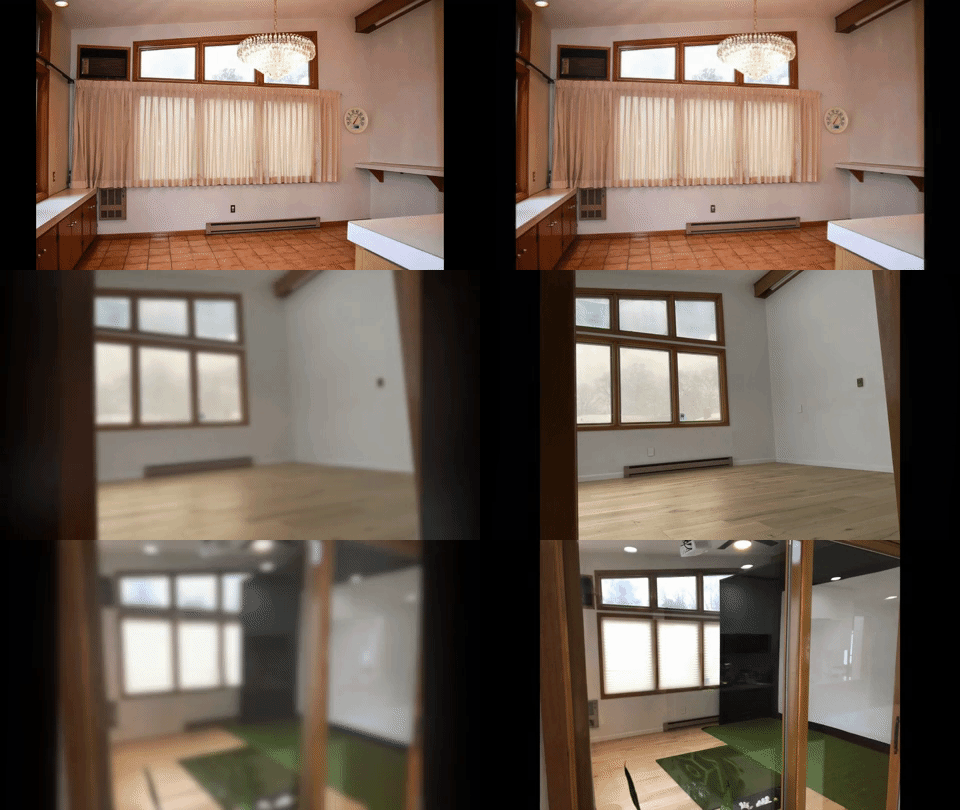
Cody had a 210 square foot sunroom sitting mostly empty. After some research, a few forums, and eventually landing on Carl's Place DIY enclosures, he built a full simulator setup on a real budget. A 9-by-12 DIY enclosure with a Premium impact screen, a FlightScope Mevo+ launch monitor, and an Optoma projector. The room already needed updating anyway, so the simulator went in alongside new floors and fresh paint.
"With the launch monitor, there is so much data that you don't get on the driving range or at the course," Cody said. "Being able to get that instant feedback has really helped me diagnose things in my golf swing that I wouldn't otherwise have."
It's also where his family hosts people now. A simulator, a projector, a multipurpose room. The golf was the reason to build it. The rest was a bonus.
"The product that you end up with if you go with Carl's Place is going to exceed your expectations for the price."
Want to see what fits in your space? Our Build Your Own tool lets you design a setup down to the inch with pricing built in.
And if you want to see more from PGA pro Mike Tabbert on using your simulator to actually improve, the full Tips with Tabbert playlist is worth bookmarking.
Search articles by tag:
Golf Simulators Launch Monitors Hitting MatsRelated Posts
Golf Simulators
A Golfer's Story: How to Practice Golf at Home

Golf Simulators
Carl's Indoor Golf Tips
DIY Golf Enclosures
Home Golf Simulator On A Budget - A DIY How-To